
From AI Image to Printable Snowboard Design: The Fitting Guide
By Ray · BoardCanvas · Specs checked against the makers' official pages
A raw AI image is not a printable snowboard design: it is the wrong aspect ratio (square vs the board's roughly 6:1), usually too low-resolution for a 155 cm print, and composed without binding inserts. BoardCanvas fixes all three when generating — aspect-ratio-adaptive cropping, high-resolution upscale mapping, and composition on the board's UV template with a 3D insert check — then exports to your maker's spec.
1. Problem one: aspect ratio
A standard snowboard is about 155 × 25 cm. A 1:1 image stretched to that shape distorts everything; cropped, it loses its subject. Generating directly on the board canvas — or adaptively cropping with the subject protected — is the fix, and it is why vertical-composition prompts outperform generic ones.
2. Problem two: resolution
Web AI images are typically 1–2 megapixels; a board at 150 DPI needs roughly 18. Upscale mapping with detail enhancement bridges the gap for most art styles; flat patterns and line art upscale cleanest, faces are the most demanding.
3. Problem three: composition vs hardware
The generator does not know where your bindings go — unless it is generating on the template. In BoardCanvas the inserts are part of the canvas from the first prompt, and the 3D preview is the final check before export.
Worked example: “Mecha Titan Future” on a Prior Pow Stick
This gallery design shows the full AI-to-print pipeline on one of the longest templates in the catalogue — a Prior powder board. The mecha artwork was generated as a series of full-board variants (10 credits each), and the winning frame was chosen for a reason that only shows up at print scale: its bold panel lines and large colour fields survive press softening, while the fine mechanical detail sits in the nose, clear of the inserts.
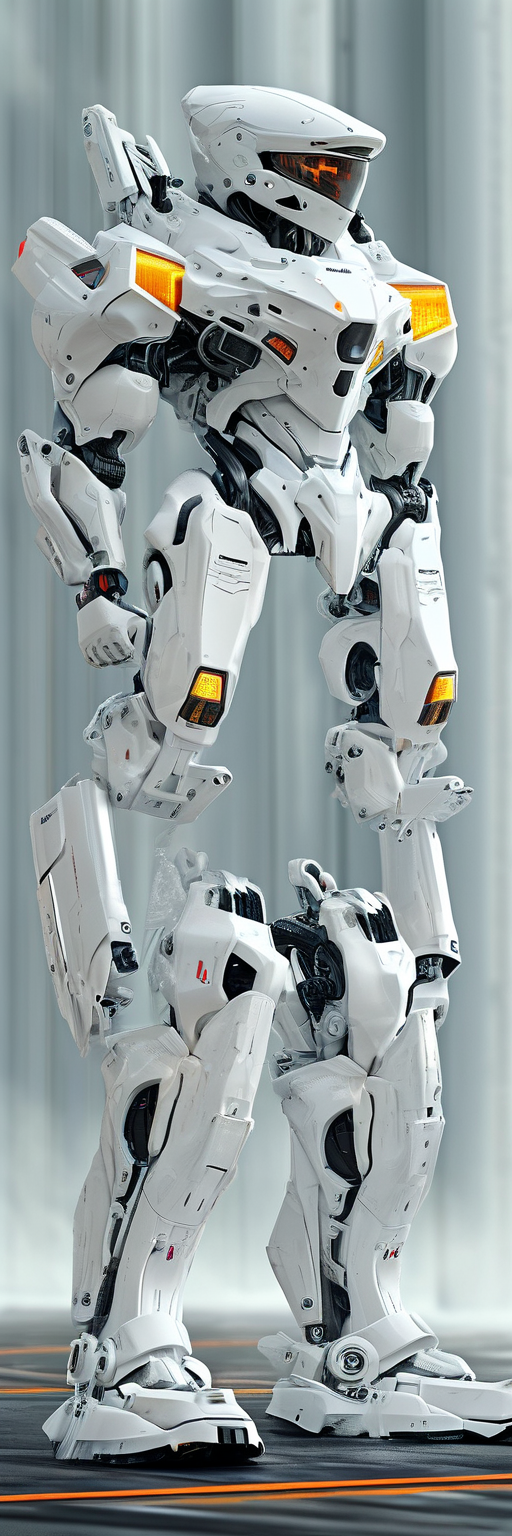
Generation: prompt for the composition, not just the subject — “full-length mecha illustration, hero figure in the nose third, energy lines flowing to the tail” gets a board-shaped picture; “a robot” gets a poster you then have to crop. Upscale: Prior's file is a 300 DPI rectangle, roughly 19,600 px on the long edge for a 160-class board; the generated art is upscaled to that canvas, then inspected at 100% — panel lines clean, small decals deliberately blurred out rather than left as fake text. Colour pass: saturated cyan and magenta were pulled slightly inside the printable range after the first proof-check, because sublimation exaggerates both. Export: full rectangle, never trimmed, inserts verified clear in the 3D view before the file left the editor.
The four failure modes of AI art at print size
1) Gibberish text — generators still fake lettering; at 300 DPI it reads as obvious nonsense. Keep text out of generated art, or add real text as a separate crisp layer. 2) Invented detail at 100% — upscalers hallucinate texture; check faces, hands and logos closely. 3) Composition drift — generators centre subjects; boards need nose-weighted composition with a quiet insert zone, which takes explicit prompting and cropping. 4) Colour surprise — screen RGB is wider than print; neon gradients band and shift. Bold shapes, honest inspection at 100%, and a palette pulled slightly back from the edge of the gamut: that is the whole discipline.
The resolution budget, in plain numbers
Work backwards from the maker's canvas. A 300 DPI Prior file for a 160-class board is roughly 19,600 × 4,000 px; a 150 DPI Donek file is roughly 9,500 × 2,000 px. AI image generators output far less than either, so upscaling is always part of the pipeline — the question is the factor. A 4× upscale of a bold, painterly design survives well; an 8× upscale of fine line art does not. Two consequences follow. First, choose subjects that upscale kindly: waves, fur, foliage, paint texture and bold graphic shapes forgive; tiny text, hairline geometry and photoreal faces do not. Second, generate at the board's aspect ratio (roughly 5:1 for a topsheet) so none of the generated pixels are wasted on areas you will crop away. In BoardCanvas, generation happens directly on the board template, which enforces both rules for you — but if you generate elsewhere and upload, the same budget applies at the export step.
Check your own file in ten seconds
Theory is cheap — run your actual image through the free snowboard print checker: it grades your file against Donek's 150 DPI and Prior's 300 DPI specs for your exact board size, entirely in your browser.
Sources
Create Your Custom Snowboard Deck
Apply these specs and design your unique AI graphics in 3D now.